
In compliance with my NDA, I have modified and obscured confidential information in this case study. This content reflects my own perspective and does not necessarily represent the views of Amdocs.
MY ROLE
As the sole product designer for the project, I led the entire design process while collaborating with product managers and learning experience designers, conducted research, and produced sketches, wireframes, and mockups.
I then supported the team through development, delivering final assets and documentation, supervising the development, and verifying the live product.
INVOLVMENT
Research
Wireframing
Design
YEAR
2022 – 2023
HONOURS
1st place HR Excellence Awards Israel 2023
L&D Awards 2024 Pune
Best Use of Technology Implementation in L&D
THE CHALLENGE
WELCOME & EDUCATE
Amdocs is a large international company with numerous departments dedicated to the various products it develops and supports. The company operates in multiple locations worldwide, often with managers and employees based in different locations.
Given its size, Amdocs experiences constant workforce turnover, with new employees frequently joining various departments. Each department has its own specific learning needs related to the products they handle, while many other learning materials are relevant across the company. At this point, each department was creating its onboarding process independently, using a variety of platforms and methods, from Excel tables to internal websites.
The challenge, initiated by the L&D department, was to develop a unified system for the learning onboarding process. This system needed to enable department experts to share their learning materials across departments, streamline the creation of onboarding content, while also allowing managers to easily assign learning tasks to new employees, and track their progress.

THE APPROACH
UNIFIED ONBOARDING INITIATIVE
Given the complexity and diversity of Amdocs’ global operations, our primary challenge was to create a cohesive onboarding system that could cater to the specific needs of various departments while ensuring a standardized experience company-wide. To achieve this, we adopted a collaborative and iterative approach.
DEPARTMENTAL DEEP DIVE
Our first step was an in-depth analysis of the existing onboarding processes across different departments. We conducted interviews with stakeholders from L&D and various departments to uncover pain points and identify opportunities for improvement.
To ensure the system’s scalability and ease of adoption, we opted to build upon existing platforms and integrate familiar tools wherever possible. By leveraging Amdocs’ existing technological infrastructure, we aimed to deliver a solution that could be rapidly deployed and easily maintained across multiple locations.
ITERATIVE DEVELOPMENT AND TESTING
Our design and development process was highly iterative. We created wireframes and prototypes that were continuously refined based on feedback from department managers and end-users. This approach allowed us to address specific user needs and ensure that the system was both intuitive and effective.
CROSS-DEPARTMENTAL COLLABORATION
A key aspect of our strategy was enabling cross-departmental collaboration. We developed a content-sharing framework that allowed subject matter experts from different departments to contribute their learning materials. This streamlined the creation of onboarding content.
GRADUAL LAUNCH WITH FEATURE EXPANSION
We initiated the rollout with a Minimum Viable Product (MVP) focused on core functionalities essential for the onboarding process. Based on user insights and evolving needs, we iteratively added new features and enhancements, ensuring the platform remained aligned with the diverse requirements of Amdocs’ global operations.
THE DISCOVERY
MAPPING THE ONBOARDING MAZE
Our journey to overhaul the onboarding process at Amdocs began with a deep dive into the unique challenges faced by the people who would be using the system. With the company’s vast scale, it was crucial to develop a system that was not only efficient but also adaptable to the specific needs of each department.
MEETING THE PEOPLE
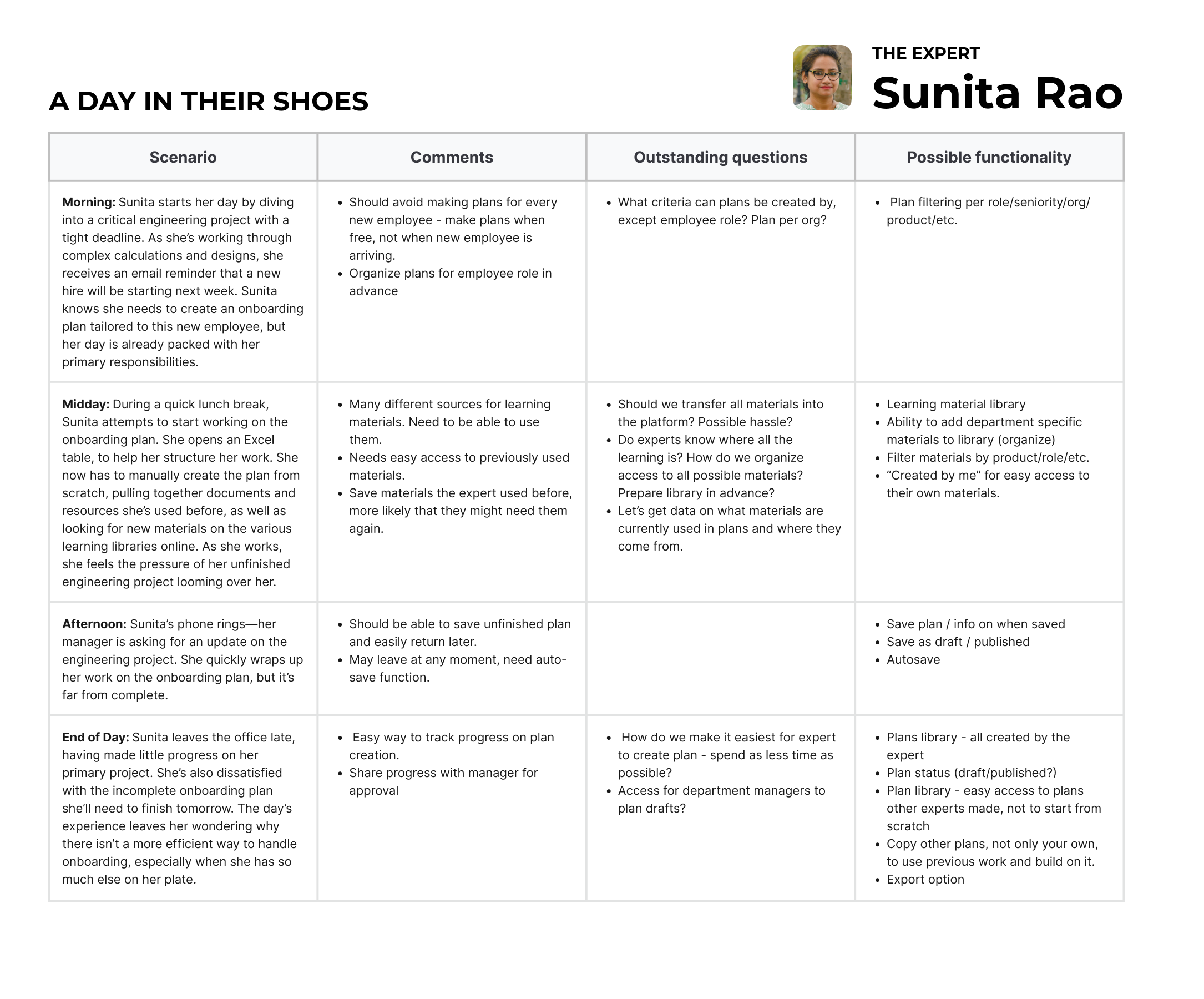
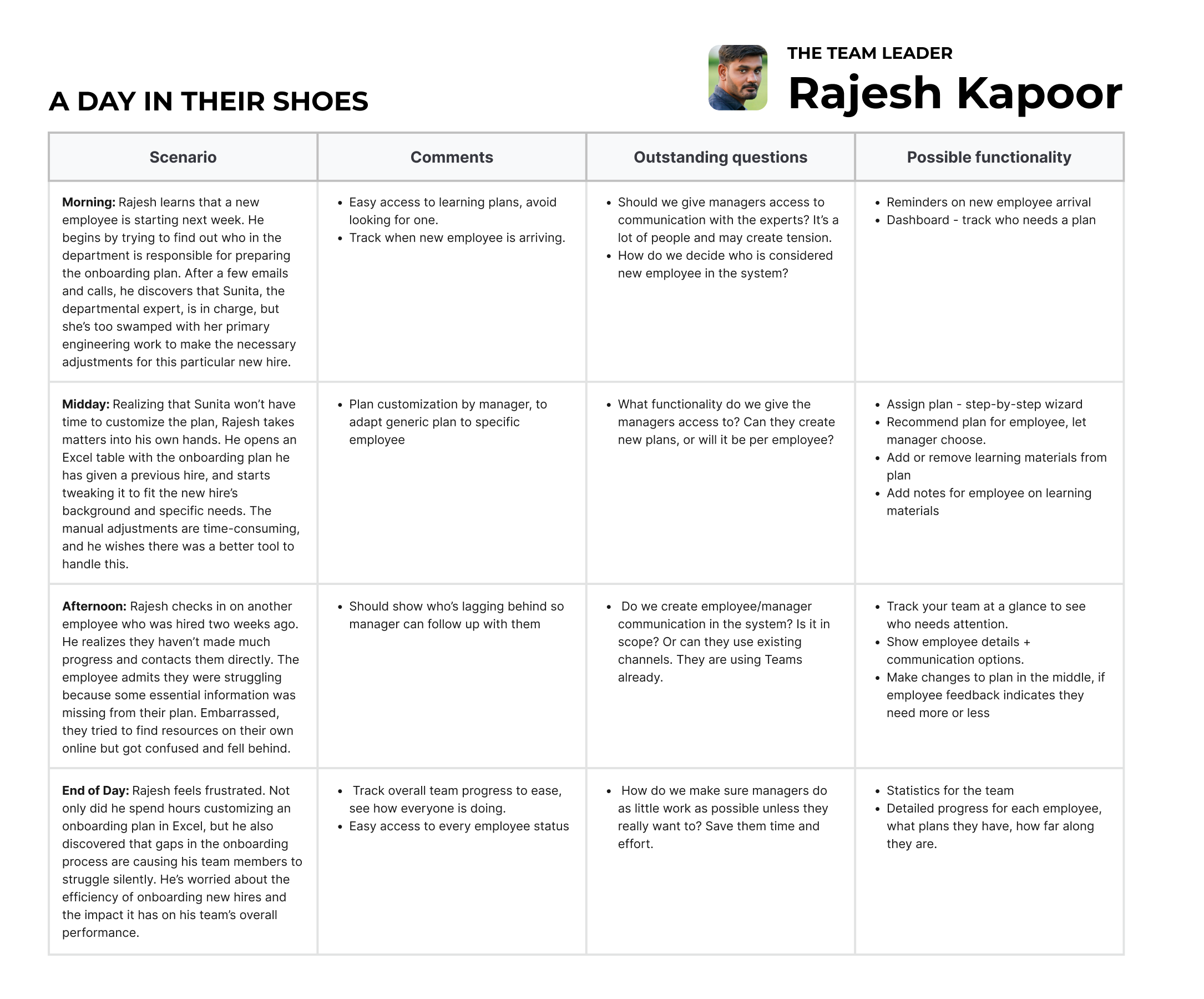
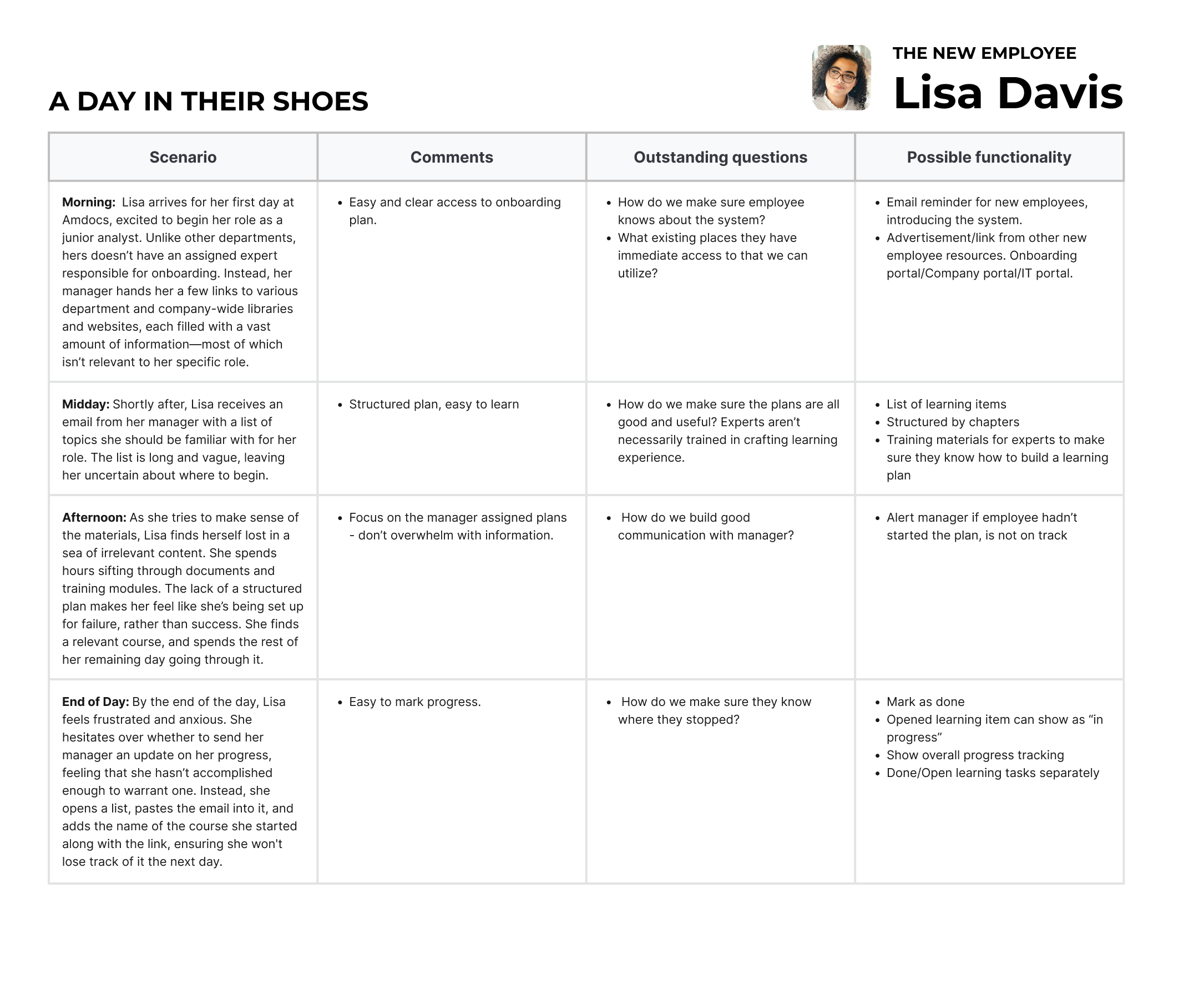
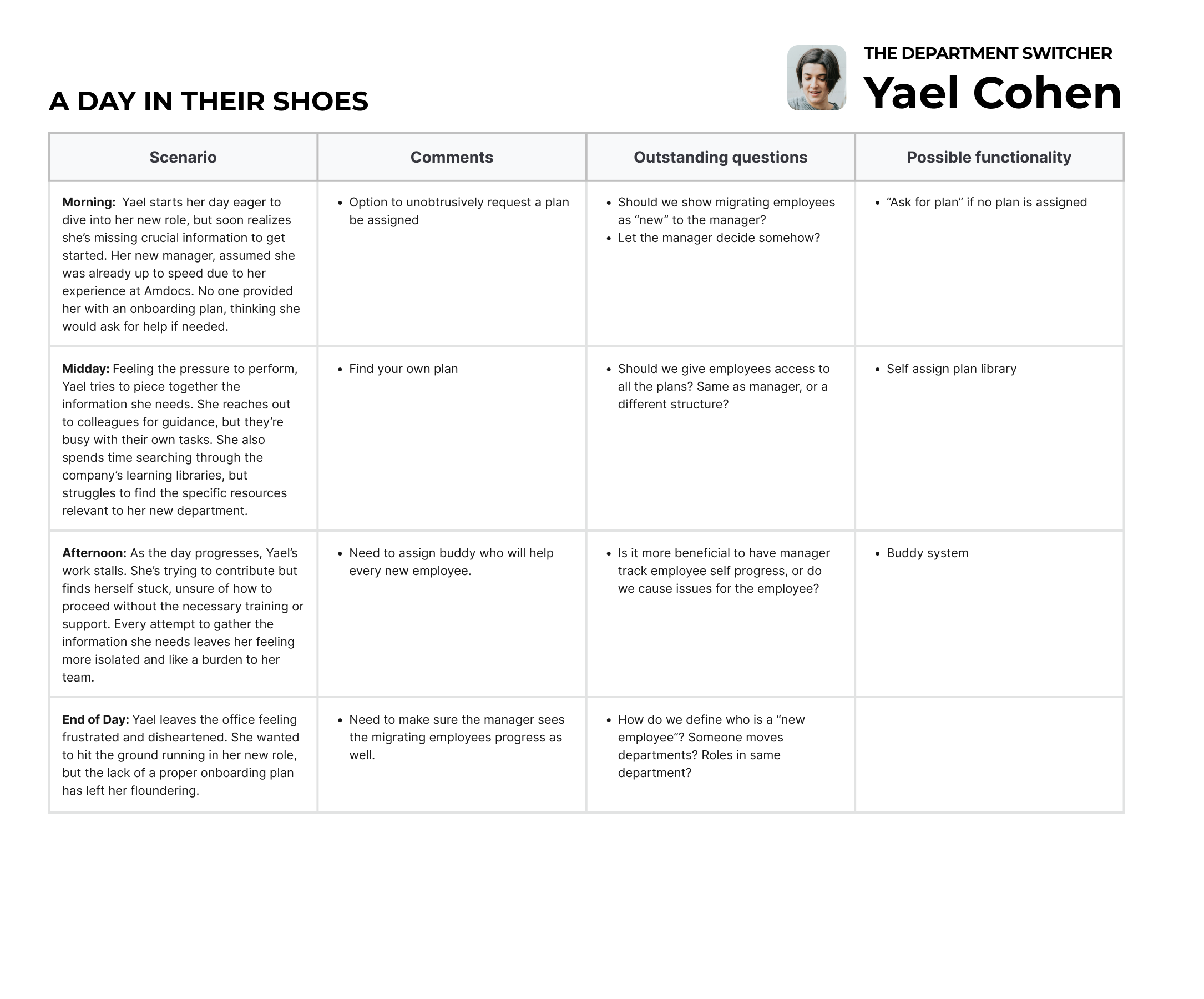
Our first step was to meet the key players—the people who would ultimately use the system. Understanding their daily challenges, motivations, and goals was crucial to designing something that truly worked for them. After studying our potential user base through existing information analysis, and a round of interviews, we came up with 4 personas.
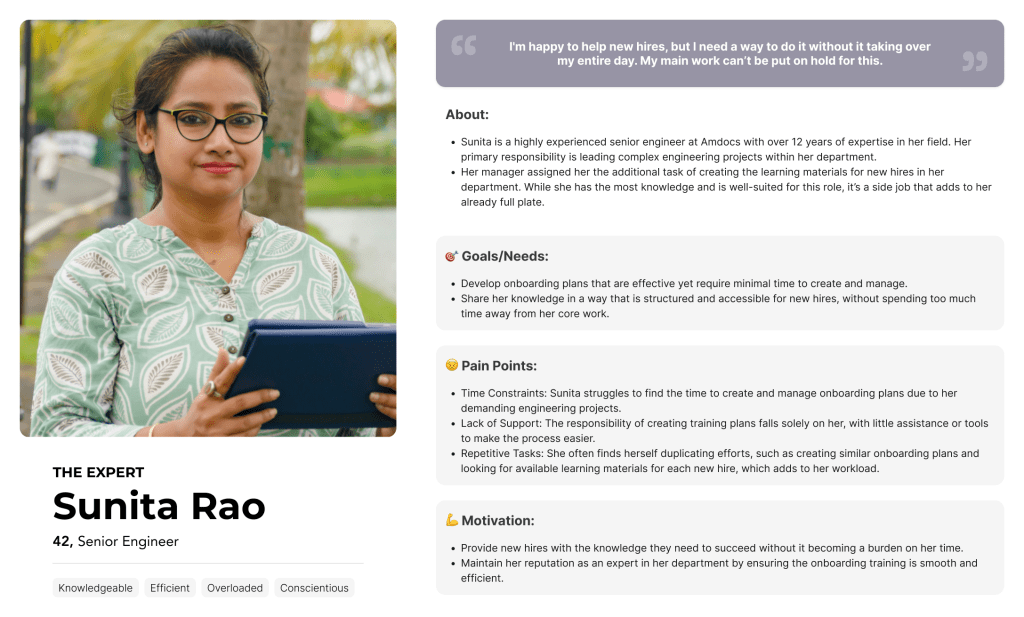
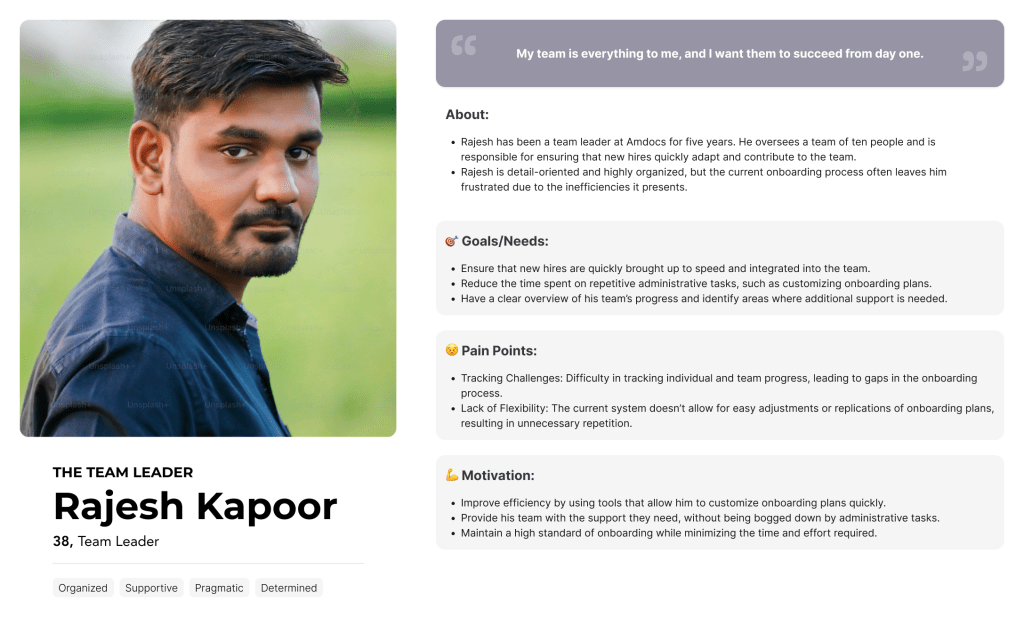
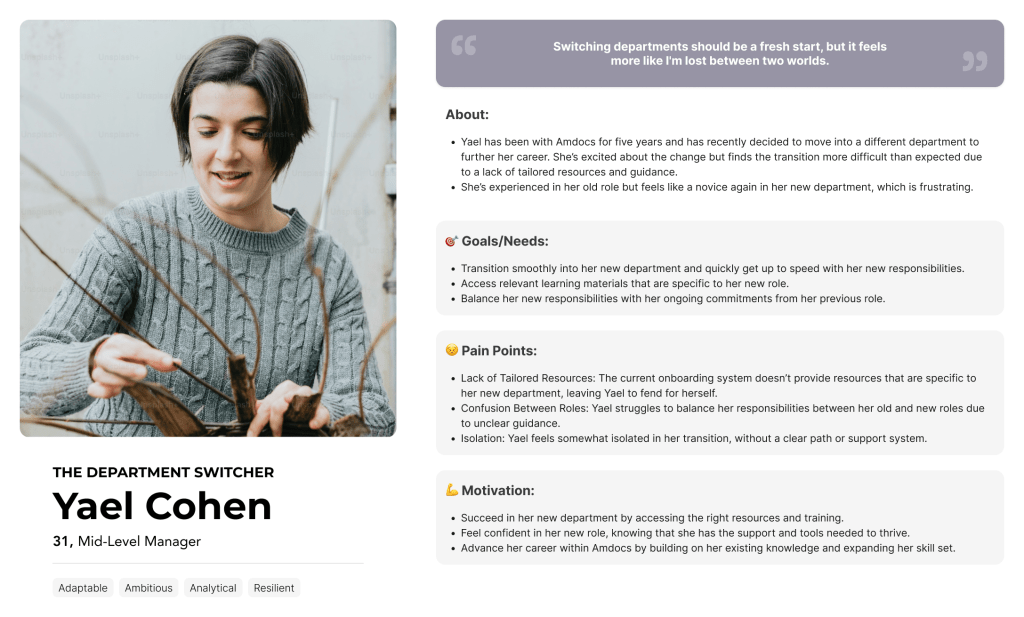
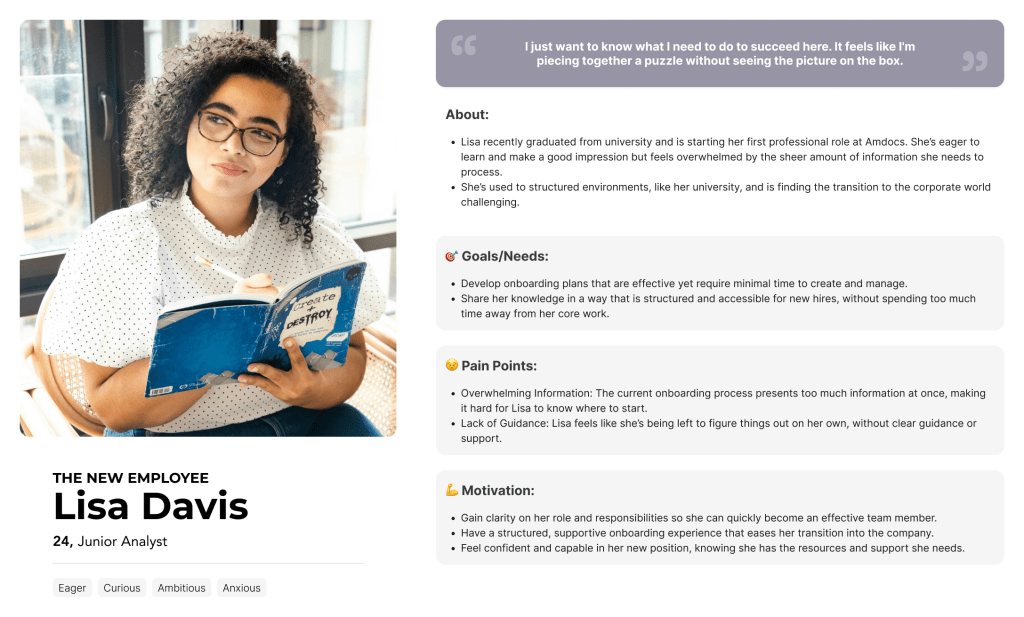
A DAY IN THEIR SHOES
To truly grasp how Sunita, Rajesh, Yael, and Lisa interact with the onboarding process, we envisioned a typical day in their lives, and tried to figure out what were their exact needs and frustrations.
THE ESSENCE OF IT
As a final step in understanding our users – we isolated what they needed to have accomplished into dedicated user task flows.
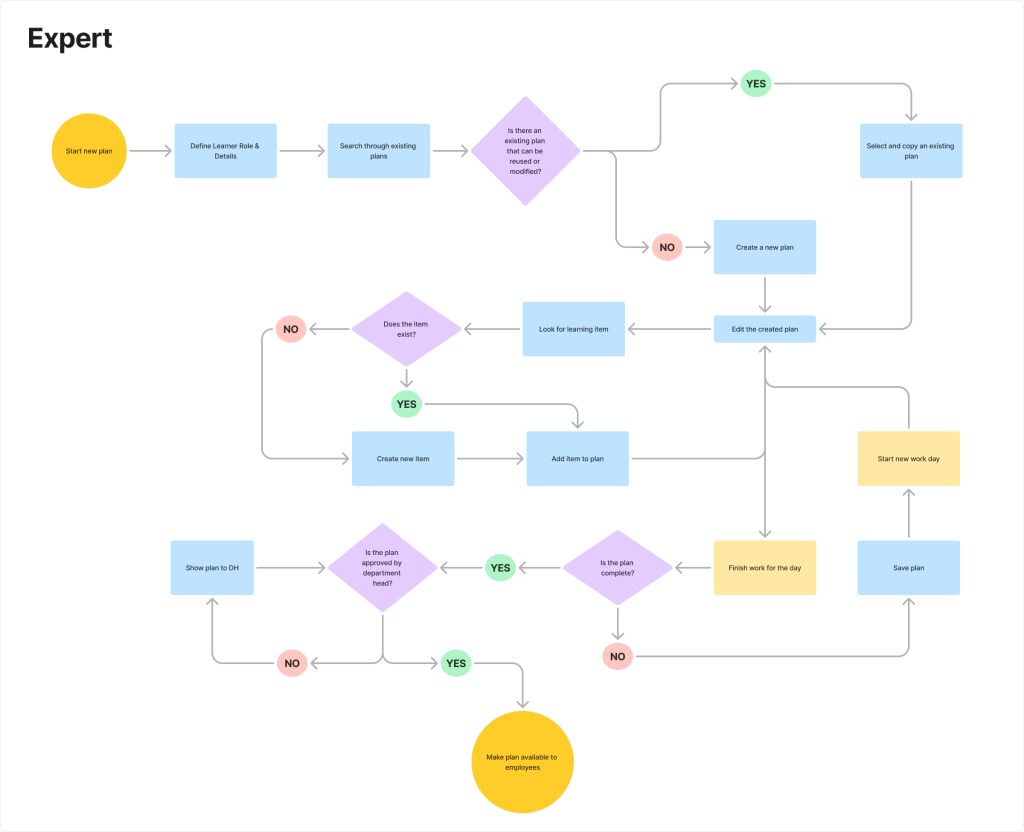
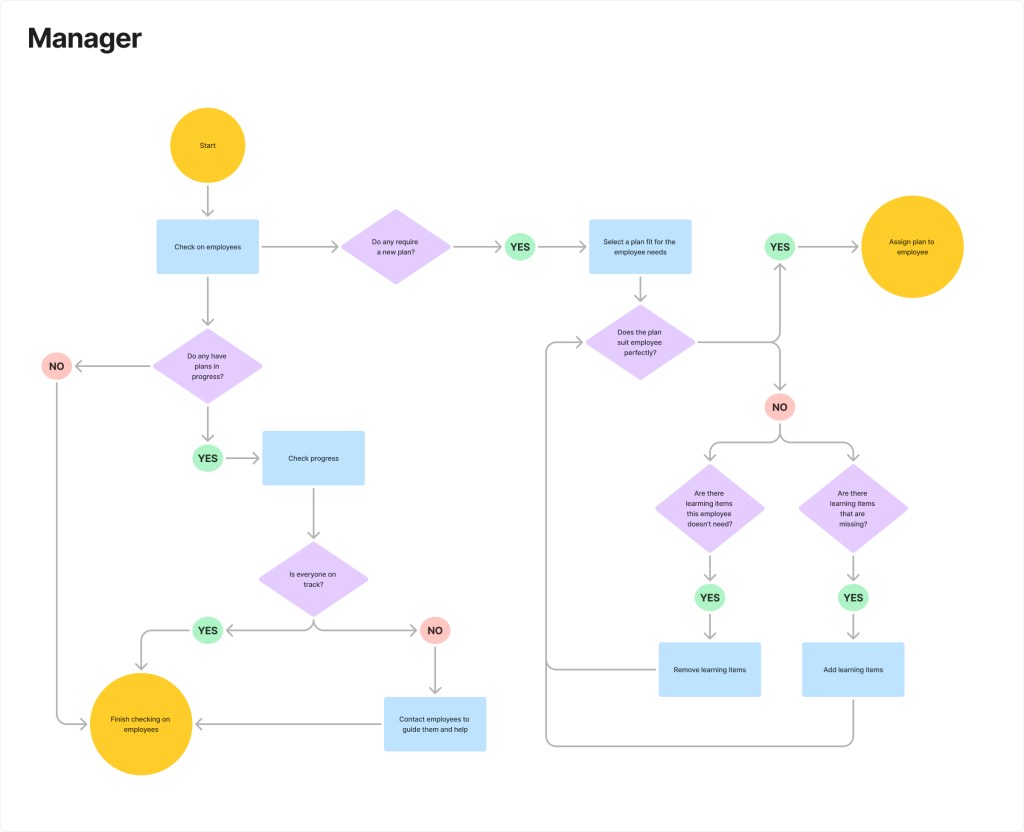
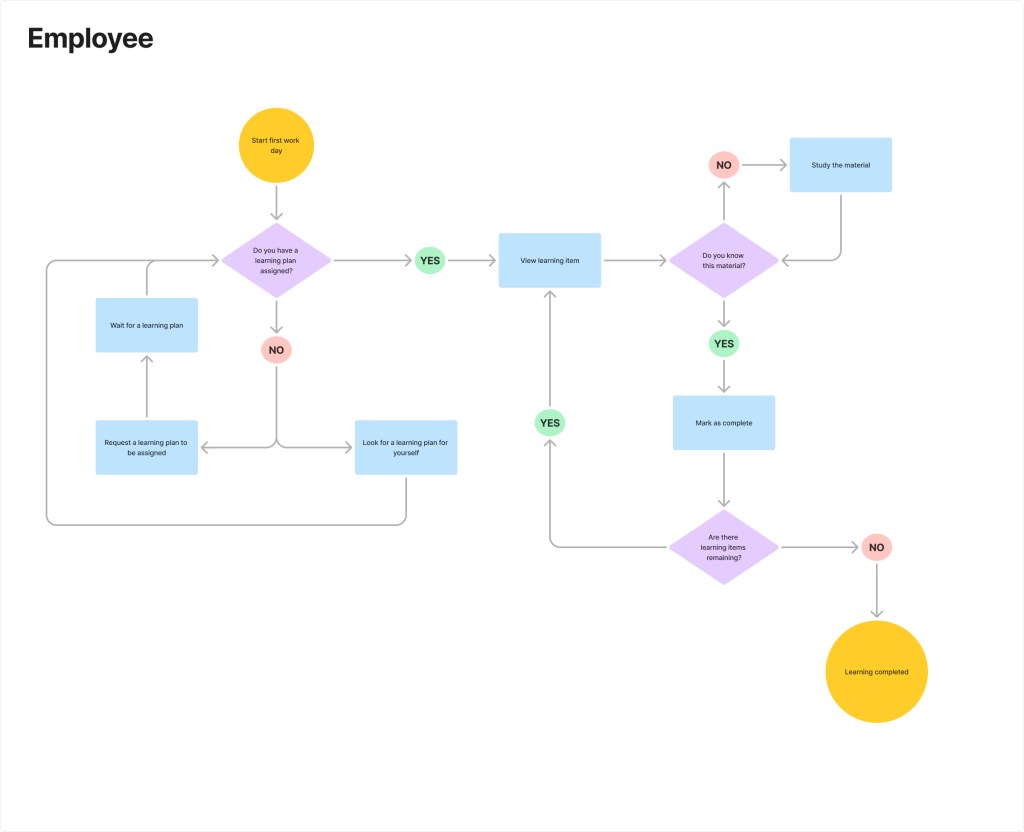
From here, we could start planning how we could make their next day go so much better.
THE PROCESS
1 SYSTEM – 3 PLATFORMS
Based on our understanding of the users and consultations with the development and information security teams, we decided to create three distinct platforms tailored to our users’ needs.
Expert Hub
CMS designed to provide the experts with the best way to create and update the plans. It was developed as a standalone entity, ensuring it received dedicated focus and remained exclusively accessible to the experts.
Manager Hub
Flexible assign and edit process as well as a dashboard to follow up on progress The manager platform was integrated into the existing Manager Hub, providing easy access from a familiar interface.
Amdocs U Learning
An employee learning portal where they can access all the plans assigned by their manager, track their progress and select their own plans for self education. The employee platform was incorporated into the existing employee onboarding portal.
PLANNING IT OUT
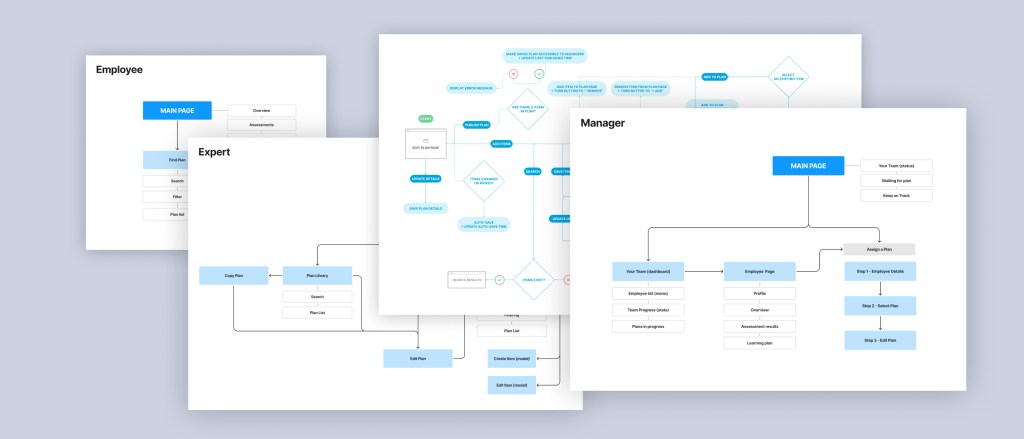
Before proceeding to wireframing, we created a sitemap and detailed user flow for each system and process. These were later adjusted to align with the evolving systems, as they grew and took shape.
WIRE THE FRAMES!
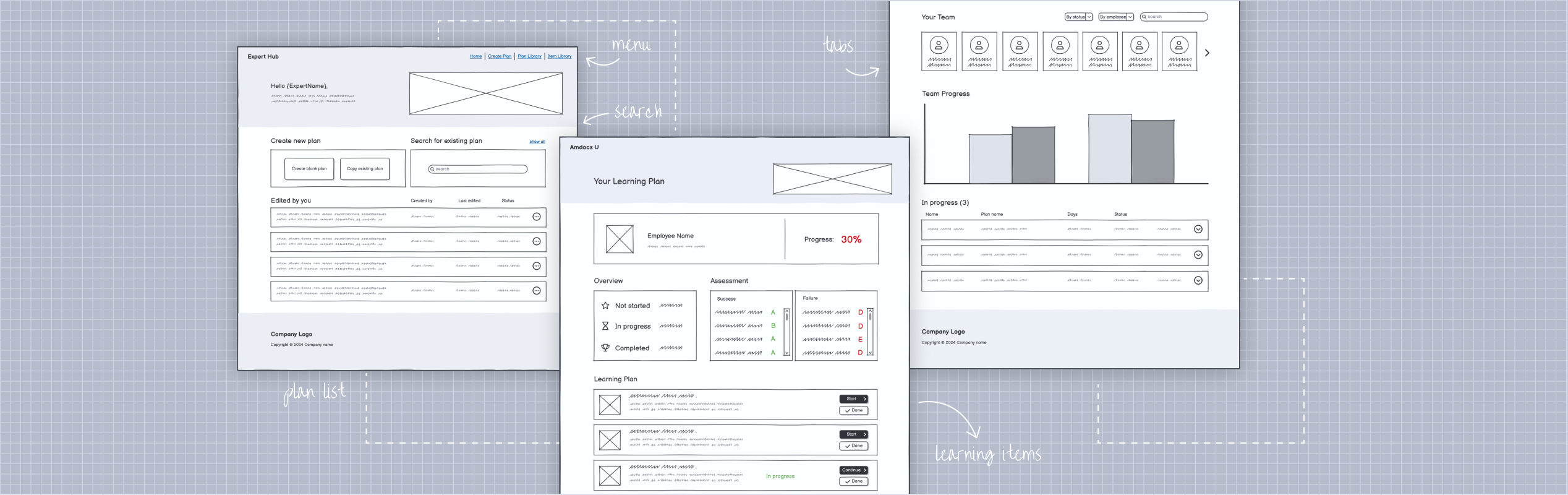
Next came the wireframing stage (using Balsamiq), where we determined which elements to include and where they should be placed.
SEPARATE BUT TOGETHER
The process for the three systems progressed almost in parallel, as all were needed for the full product rollout to users.
Certain features took priority over others—for example, Experts prepared multiple plans in advance using an Excel table format, while a team of learning developers worked on compiling a comprehensive library of existing learning materials.
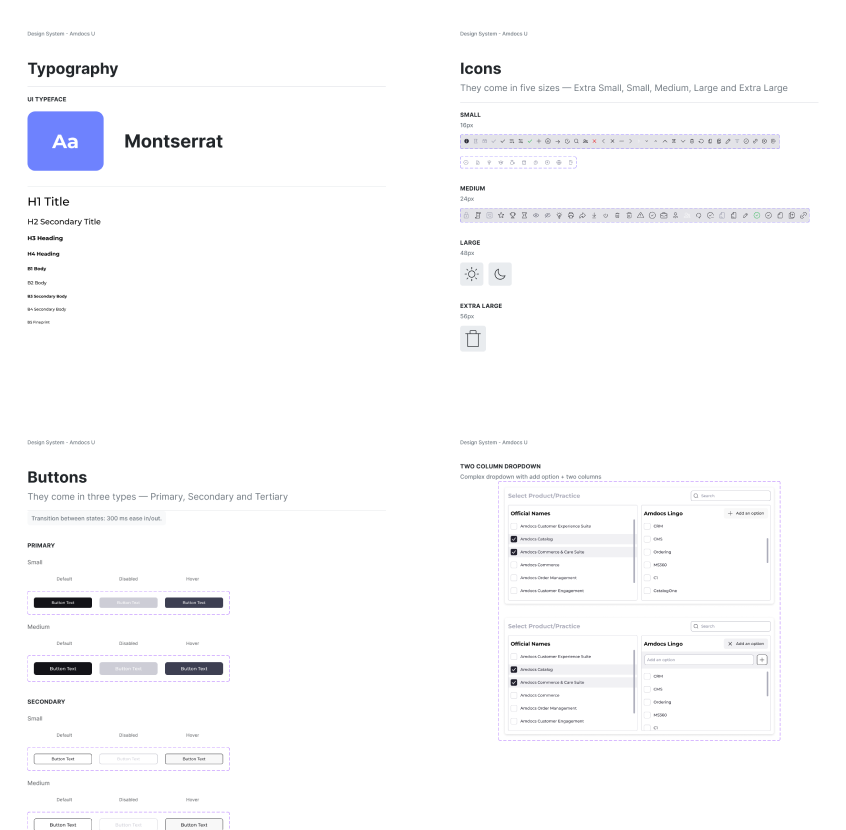
DESIGN SYSTEM
While adhering to the Amdocs brand guidelines and the design system provided by the product design department, we customized it to suit the specific needs of our projects. From there, we evolved it into a distinct, learning-focused system.

FINAL DESIGN
EXPERT HUB
1. GETTING AROUND
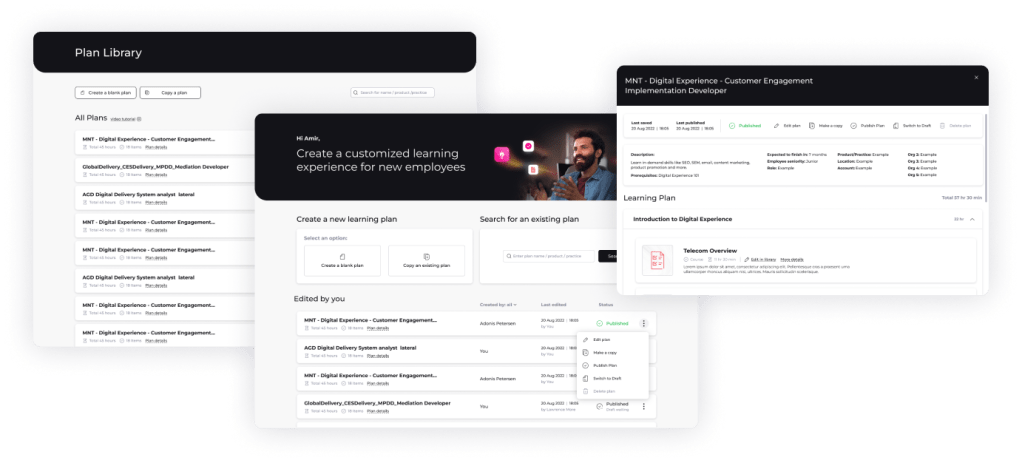
The main page was created to allow experts quick access to key functions: creating new plans, searching for existing ones, and filtering through their most recent plans, whether created or edited. The plan library displayed all expert community-created plans, offering options to manage and preview them without entering edit mode.
To safeguard shared content, we implemented failsafes to prevent accidental deletion, as experts have full access to each other’s plans.
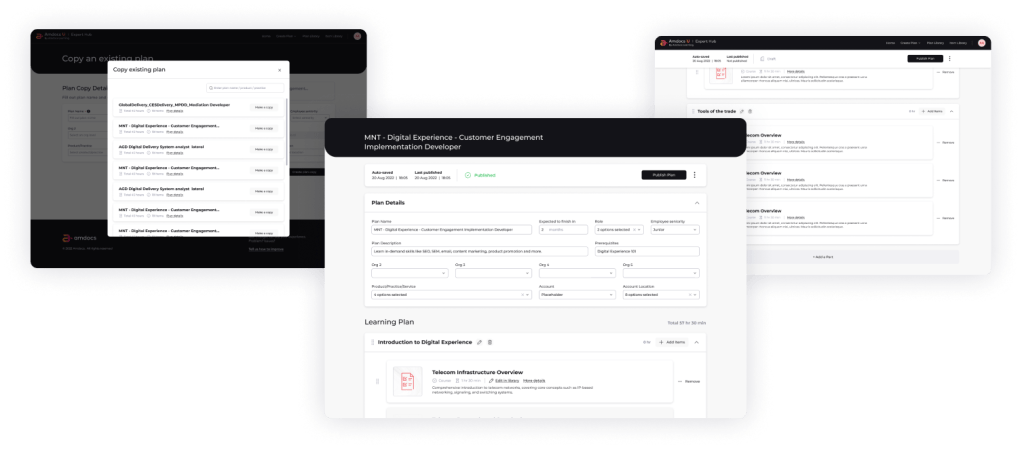
2. PLAN CREATION & EDITING
To simplify plan creation, we allowed experts to copy any existing plan, requiring only a unique plan name. This enabled them to easily modify the copied plan to meet their new needs. If no suitable plan was available for copying, a new plan could be created from scratch.
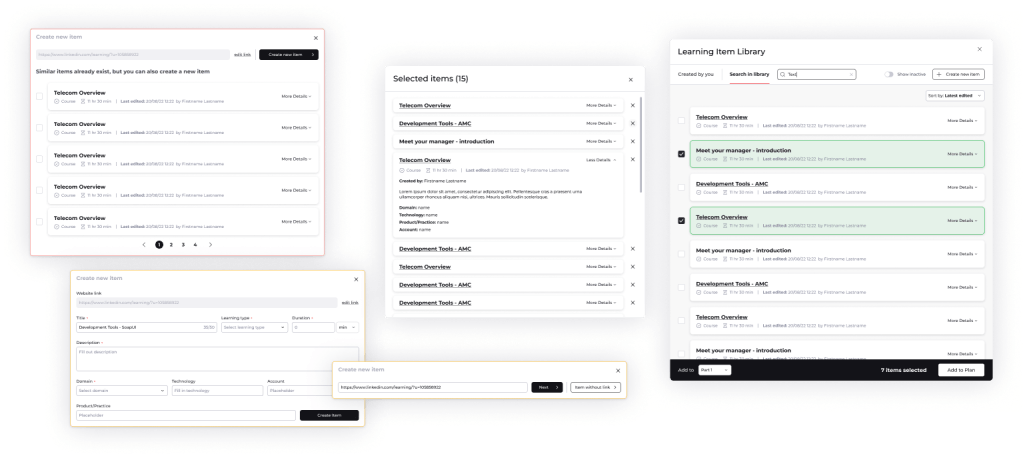
3. ITEM LIBRARY
The item library was arguably the most crucial feature of the expert portal. For the first time, experts could share their learning materials with others, streamlining their workflow for greater ease and efficiency.

MANAGER HUB
1. ASSIGN A PLAN
We divided the process of assigning a plan to an employee into three stages:
- Selecting employee details – managers could assign a plan to one or several employees at once.
- Choosing a plan – an algorithm suggested the best available plans based on the employee selection in the previous step.
- Editing the plan – after selecting a plan, managers could customize it by removing parts or adding extra learning items from the library.
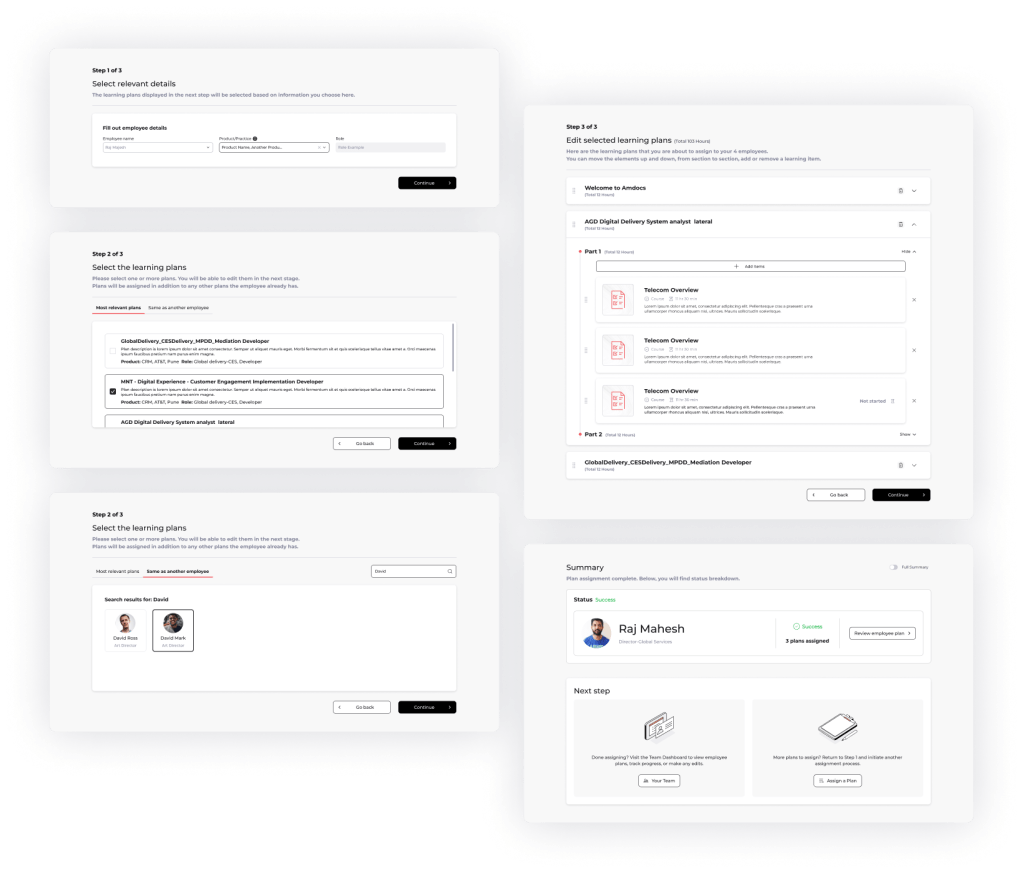
During testing, we discovered managers needed the ability to assign multiple plans to a single employee and to save their selections for easy reuse with other employees. This led to the addition of “multiple plan selection” and “same as another employee” features, giving managers greater flexibility.
2. TEAM OVERVIEW
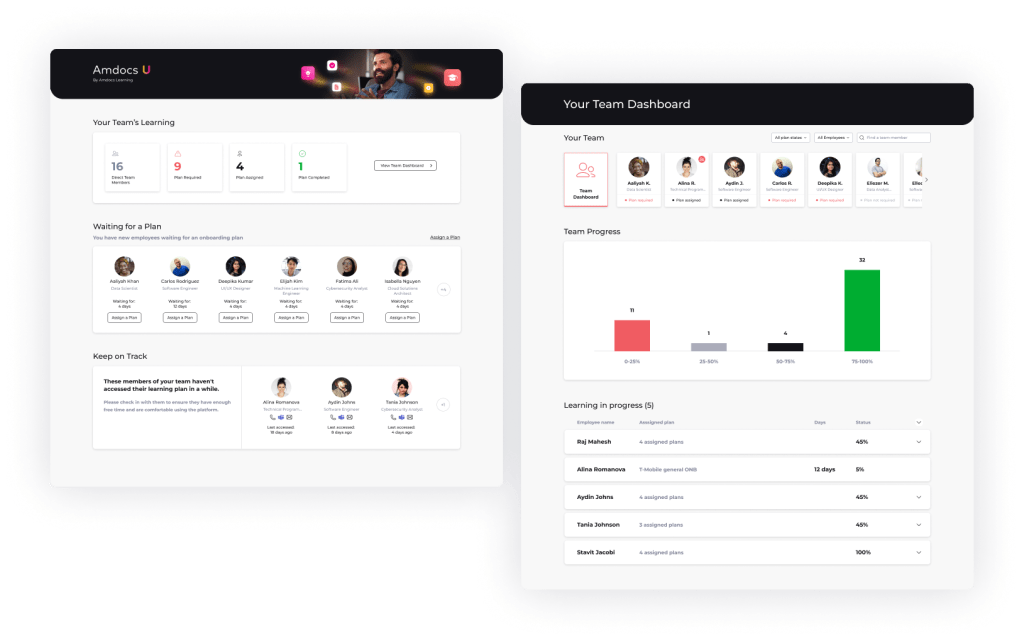
Managers needed an easy way to overview their teams, so we developed two pages to meet their needs:
- Main Page – provided a bird’s-eye view of key areas requiring attention. Managers could quickly see which new employees needed plans, identify learners falling behind, and get an overall count of active plans.
- Team Dashboard – featured a detailed list of direct employees, with the ability to drill down into subordinates. It also displayed team progress statistics and a list of all active plans with their current status.
3. EMPLOYEE PAGE
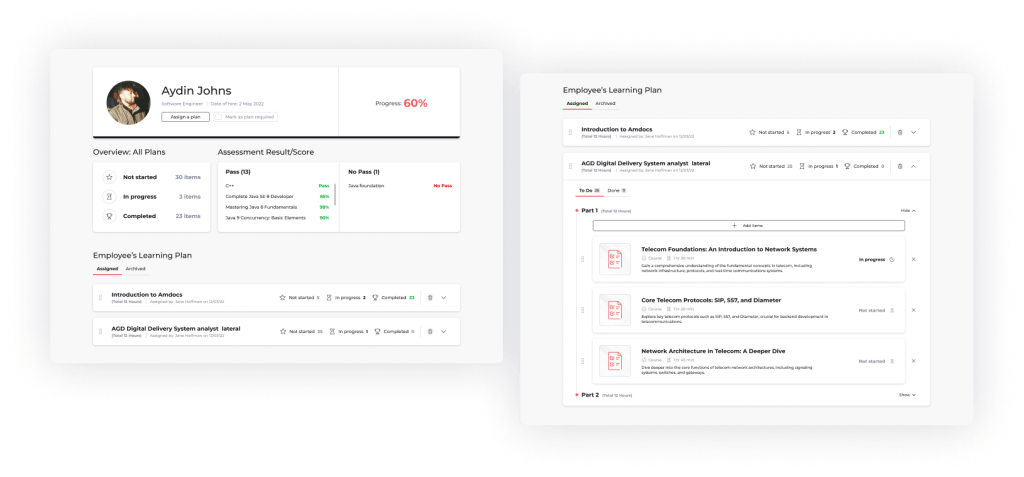
When the manager clicked on an employee, they could view the exact plan, track progress, and see assessment results for that employee. This detailed view provided a clear understanding of each employee’s learning journey.
From this page, managers could also monitor progress for each learning item, remove unnecessary plans or parts of a plan, and add more items if needed. This allowed managers to keep a close eye on the employee learning and make adjustments as required to support their progress.

EMPLOYEE PORTAL
1. LEARNING PATH
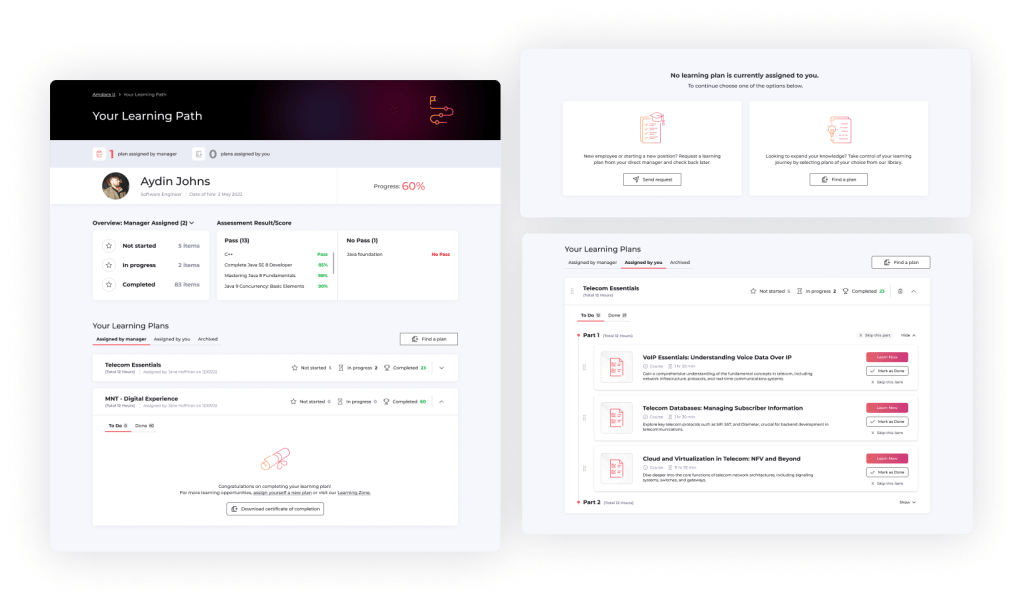
The employee learning portal was intentionally designed to mirror the structure of the manager’s view of the employee page. This approach facilitated easier communication between managers and employees, ensuring that both parties were on the same page when discussing progress and plans.
During testing, we added an “archive” tab to the employee plans, enabling access to older, completed plans for future reference without cluttering their current learning path.
2. FIND A PLAN
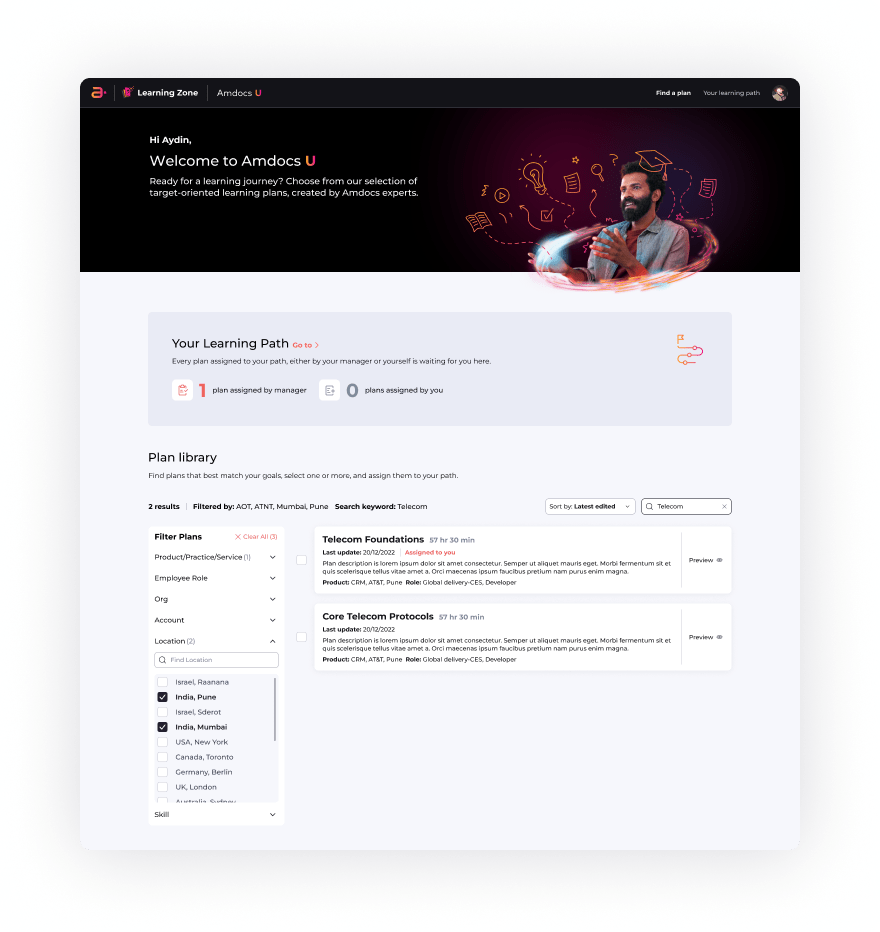
To give existing employees control over their continued education, either during or before a role change, we developed the Amdocs U portal within the Amdocs Learning Zone. This allowed employees to search for learning plans and add them to their own learning path. These self-selected plans were housed in a separate tab from the manager-assigned plans.
Unlike manager-assigned plans, employees had the flexibility to remove or skip unnecessary items from these self-selected plans. While managers could view these plans, they could not edit or modify the ones chosen by the employee.
This project taught me valuable lessons on designing a co-dependent system for multiple user types, each with distinct and unique roles.
Next Project →
Blo Delek
Comprehensive redesign of an outdated system used by fuel companies for the submission and payment of their taxes.
 Dalia Lev - Portfolio